
Water Softener Troubleshooting Guide
Content updated
Sources last checked
Water softener symptoms can have several causes. Start with safe, visible checks from your exact manual: salt level or a bridge, bypass position, power, clock, settings and the event record. Brine draw or internal valve faults may require model-specific service. Use the symptom table to organize evidence for the observation you actually have.
Find the observed symptom below, use the owner checks allowed by your exact manual, and follow the detailed guide. The table lists possibilities, not a ranking of failure rates.
First rule: Deal with leaks and water near electrics before anything else. Then change one thing at a time, starting with salt, bypass and power, and write down what you changed.
Safety first
Stop and deal with these before any troubleshooting:
- Water on the floor, a leaking tank or an overflowing brine tank. Put the softener in bypass if your manual shows how, or close the main water valve, and call for service.
- Water near the plug, transformer or controller. Do not touch wet electrical parts; switch off the circuit at the breaker first.
- A problem that looks like water quality rather than hardness (odor, color, sediment, illness). A softener only treats hardness and some clear-water iron; contact your utility or a certified lab.
Symptom finder
| Symptom | Possible causes to verify | Detailed guide |
|---|---|---|
| No soft water | No salt; salt bridge; bypass left open; no power; clogged nozzle and venturi | Not using salt, not regenerating |
| Water hard only sometimes | Clock wrong; hardness set too low; hot water used during regeneration; hardness of supply went up; a leak increasing use | Hardness setting |
| Salt level not dropping | Salt bridge; bypass open; softener not regenerating; no brine draw | Not using salt, salt bridge |
| Brine tank full of water | Clogged nozzle and venturi; kinked or blocked drain hose; low water pressure; brine float stuck | Section below |
| Water running to the drain nonstop | Valve not finishing its cycle or leaking internally | Service call |
| Regenerates too often | Hardness set too high; leaks; reserve or day settings | Regenerating too often |
| Not regenerating | Power, bypass, meter, settings; then motor or board | Not regenerating |
| Salty-tasting water | Too much water in the brine tank; low pressure | Section below |
| Orange or brown stains | Iron not set in the controller; resin fouled with iron; iron type a softener cannot remove | Section below |
| Error code, clicking, stalled motor | Switch, wiring, motor, board or valve fault | Section below |
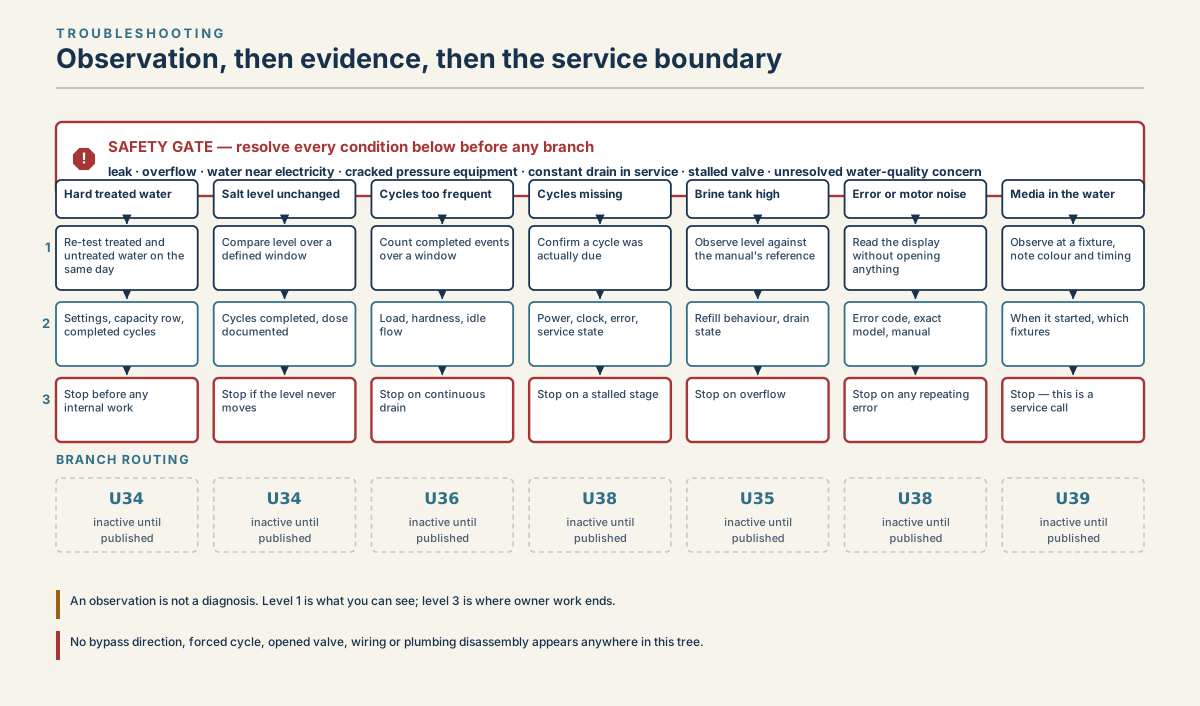
Three-level water softener troubleshooting tree showing safe checks, supporting evidence, and service stop conditions for seven observable symptom branches.
Read diagram in text
- TROUBLESHOOTING
- Observation, then evidence, then the service boundary
- !
- SAFETY GATE — resolve every condition below before any branch
- leak · overflow · water near electricity · cracked pressure equipment · constant drain in service · stalled valve · unresolved water-quality concern
- 1
- 2
- 3
- Hard treated water
- Re-test treated and
- untreated water on the
- same day
- Settings, capacity row,
- completed cycles
- Stop before any
- internal work
- Salt level unchanged
- Compare level over a
- defined window
- Cycles completed, dose
- documented
- Stop if the level never
- moves
- Cycles too frequent
- Count completed events
- over a window
- Load, hardness, idle
- flow
- Stop on continuous
- drain
- Cycles missing
- Confirm a cycle was
- actually due
- Power, clock, error,
- service state
- Stop on a stalled stage
- Brine tank high
- Observe level against
- the manual's reference
- Refill behaviour, drain
- state
- Stop on overflow
- Error or motor noise
- Read the display
- without opening
- anything
- Error code, exact
- model, manual
- Stop on any repeating
- error
- Media in the water
- Observe at a fixture,
- note colour and timing
- When it started, which
- fixtures
- Stop — this is a
- service call
- NEXT GUIDE
- Not using salt
- bridge, bypass,
- settings
- Not using salt
- bridge, brine draw,
- brine line
- Too many cycles
- hardness setting,
- water use, leaks
- Not regenerating
- power, bypass,
- clock, meter
- Not using salt
- injector, venturi,
- drain hose
- Not regenerating
- error codes and
- technician faults
- Repair or replace
- parts, warranty,
- dated quotes
- An observation is not a diagnosis. Level 1 is what you can see; level 3 is where owner work ends.
- Each guide lists its checks in order. The safety gate at the top still applies to every branch.
No soft water
Work down this list, which follows Whirlpool's troubleshooting table for its WHES30/33 softeners and Pentair's for its Whole House systems:
- Salt. If the tank is empty, refill it and start a regeneration (Whirlpool: "Recharge Now"). See how to manually regenerate.
- Salt bridge. If the tank looks full but the salt is not dropping, push a marked broom handle down through the salt and break any crust. See the salt bridge guide.
- Bypass valve. If it is in the bypass position, move it to service. Pentair lists an open bypass first.
- Power. If the display is blank, check the outlet, fuse or breaker and any wall switch. After power returns, reset the controller if needed and start a regeneration.
- Brine draw. If the tank is full of water, or water runs to the drain while the unit is in service, go to the brine section below.
If all of these check out and the water is still hard after a completed regeneration, the resin may have lost capacity or the valve may be leaking internally; that is a service call.
Water hard only sometimes
Whirlpool's table lists six causes for water that is hard some of the time:
- Wrong time of day on the controller, so regeneration runs while you use water. Reset the clock.
- Hardness set too low. Retest untreated water and update the hardness setting.
- Wrong model code on Whirlpool controls. The manual shows how to check it.
- Hot water used during regeneration. The water heater refills with hard water. Avoid hot water while the softener regenerates.
- Supply hardness went up. Test untreated water for hardness and iron, and reprogram.
- A leaking faucet or toilet. Whirlpool notes a small leak can waste hundreds of gallons in a few days, using up capacity early. EPA's leak check: read your water meter, use no water for two hours, and read it again.
Salt level not dropping
Possible explanations include no cycle due yet, a salt bridge, a missed regeneration or inadequate brine draw. Record salt level and completed cycles first, then check bypass, power and clock. Observe the brinewell only as your manual permits. The full checklist is in softener not using salt.
Brine tank full of water or water running to the drain
Some water in the brine tank is normal: Pentair's 5600SXT manual describes a brine refill stage that puts water in the salt tank to make brine for the next regeneration. A tank full of water, together with hard water, is not. The cited Whirlpool troubleshooting table lists these possible causes and model-specific remedies. Checks that require plumbing changes, pressure adjustment, disassembly or replacement need the appropriate qualified service:
| Possible cause from the manual | Model-specific remedy to confirm |
|---|---|
| Dirty or plugged nozzle and venturi | Clean it (steps) |
| Drain hose kinked, bent sharply or blocked | Straighten or clear it |
| Valve drain line and brine tank overflow joined with a tee | Run them as separate drain lines |
| Low water pressure (below 20 psi in the cited troubleshooting example) | Have a qualified provider verify supply pressure and the model's requirement |
| Pressure over 100 psi in the day | Add a pressure-reducing valve (plumber) |
| Brine float dirty or broken | Clean or replace the float assembly |
| Inner valve leak, or leak between valve and tank | Service: seals, rotor or O-rings |
Water running to the drain all the time, while the softener shows it is in service, points to the valve. Pentair lists a powerhead that does not complete its cycle, foreign material in the valve, and internal leaks. EPA's guide notes that a continuous trickle to the drain could indicate a broken valve. Put the softener in bypass and call for service.
Salty water, iron stains or resin beads
- Salty-tasting water. Pentair's Whole House manual links salt water in the house to too much water in the brine tank or low water pressure. Check for the brine-tank causes above.
- Orange or brown stains (iron). Whirlpool's table gives three causes: clear-water iron the controller is not set for (test for iron and program it; see the hardness guide), iron built up in the resin (clean it with a resin cleaner), and bacterial or organic iron, which a softener cannot treat.
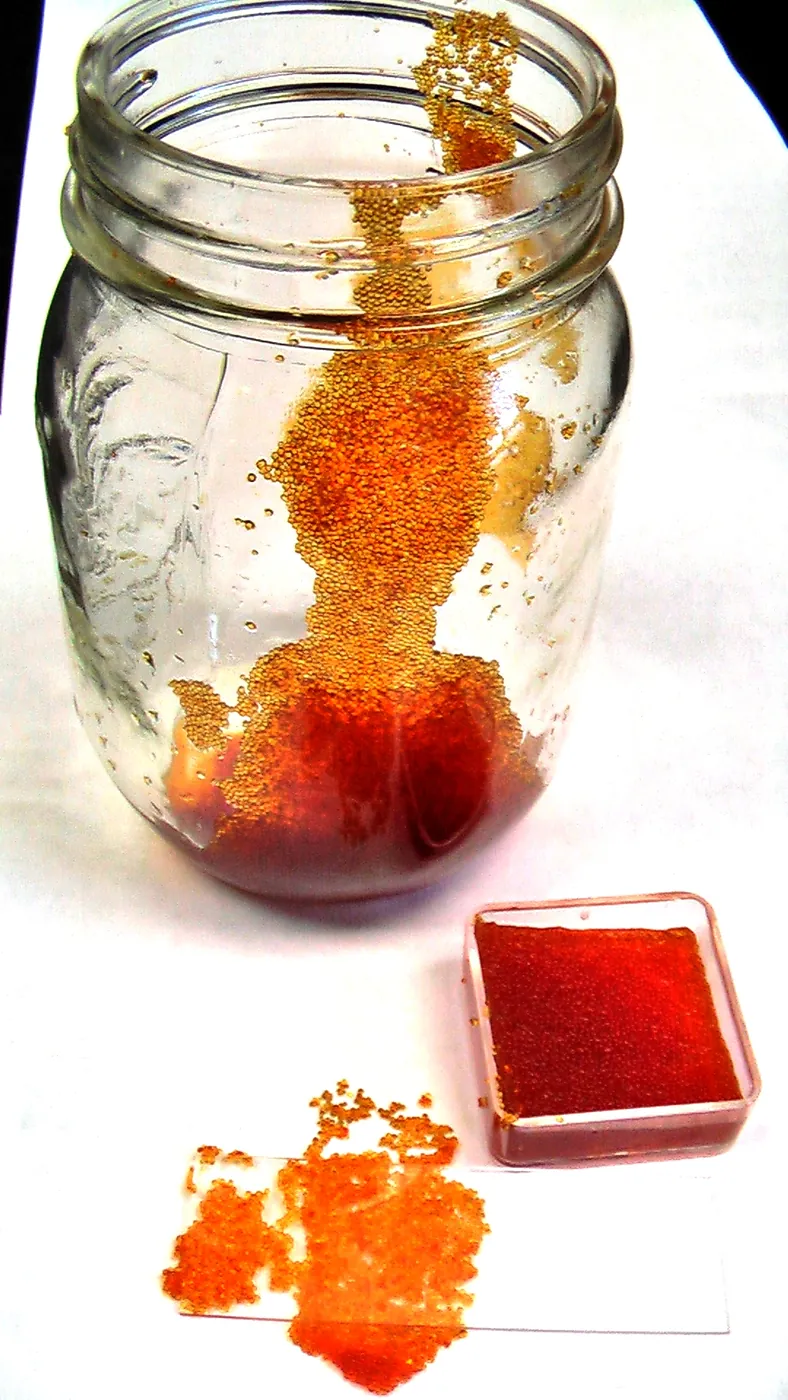
- Small beads in faucet screens or pipes. They may indicate media escaping the tank. Whirlpool lists a cracked distributor or riser tube as possible causes requiring internal service. Preserve a sample/photo for diagnosis; this symptom alone does not decide whole-system replacement.

Error codes, clicking or a stalled motor
Look the code up in your manual. On the Whirlpool WHES30/33:
- Err1, Err3, Err4: wiring or connections to the position switch, the switch itself, a valve fault causing high torque, or the motor.
- Err5: the electronic control.
- Motor stalled or clicking: motor malfunction or an internal valve fault.
To clear a Whirlpool code, unplug the power supply, correct the problem, plug it back in and wait 8 minutes; the code returns if the problem remains. On the Fleck 5600SXT, error 2 means no regeneration for more than 99 days and is cleared with a manual regeneration; errors 0 and 1 point to the powerhead. All of these, apart from the regen-overdue code, end with a technician.
Before you call for service
A technician can diagnose faster with:
- the brand, model and model code;
- what you saw, and when it started;
- salt level notes, and whether you found a bridge;
- the bypass position and any error code;
- a hardness test of softened water and of untreated water;
- what you already tried.
The service evidence checklist is a printable version of this list, and the service checklist covers quotes and the visit itself. If you are weighing a repair against a new unit, see repair or replace.
The symptom decision tree maps every branch to one of these pages:
- salt level is not dropping;
- a hard crust in the brine tank;
- the softener regenerates too often;
- the softener does not regenerate;
- deciding whether to repair or replace; and
- preparing for a service visit.
Frequently asked questions
What should I check first when a water softener is not working?
Check for leaks and water near the electrics first. Then check the salt and cycle record: an empty tank or bridge is one possible explanation for hard water. Next confirm the bypass valve is in service and the display is on with the correct time. Only then look at brine draw and settings.
Why is my water hard when the tank has salt?
The salt may not be reaching the water because of a salt bridge, or the softener may not be drawing brine because of a clogged nozzle and venturi, a kinked drain hose or low pressure. A bypass valve left open, a wrong clock or a hardness setting that is too low can also let hard water through.
Why is there so much water in my brine tank?
Some water is normal, but a tank full of water usually means the softener is not drawing brine. Whirlpool lists a plugged nozzle and venturi, a blocked or kinked drain hose, drain lines joined with a tee, low water pressure and a stuck float. If those are fine, an internal valve leak needs service.
When should I call a water softener technician?
Call when water keeps running to the drain, the tank or valve leaks, an error code returns after you clear it, the motor clicks or stalls, resin beads appear in your plumbing, or the water stays hard after you have checked salt, bypass, power, settings and the venturi. Bring the model and your notes.
Sources
Sources were consulted on the dates shown. Causes and fixes come from the manuals named, so confirm them for your model.
- U.S. Environmental Protection Agency WaterSense, Guide to Selecting and Maintaining a Water-Efficient Water Softener, May 2026; consulted September 24, 2026.
- U.S. Environmental Protection Agency WaterSense, Home Maintenance — Water Softeners, updated June 16, 2026; consulted September 24, 2026.
- Pentair, Whole House Water Softening System Installation and Operation Manual; consulted September 24, 2026.
- Whirlpool Water Solutions, Water Softener Installation and Operation Manual, document 7392301; consulted September 24, 2026.
- Pentair, Pentair 5600SXT manual; consulted September 24, 2026.
- Pentair, Pentair support FAQ; consulted September 24, 2026.