
Water Softener Settings Guide
Content updated
Sources last checked
The Whirlpool and Pentair examples below include these owner-visible settings: the time of day, the regeneration time, the water hardness, and on some models iron, salt type and a salt-efficiency or salt-level option. The rest (capacity, reserve, regeneration type, cycle times) are installer settings that match the hardware and are usually best left alone.
The table below explains each setting, what to enter, and which ones to leave to a dealer. Write down every value before you change anything, and change one setting at a time so you can tell what made the difference.
Settings rule: Set the owner settings from your own water test and your manual. Record owner-visible values before changing them. Have the dealer preserve and review installer settings; change one approved value at a time.
Owner settings at a glance
| Setting | What to enter | Example from a manual |
|---|---|---|
| Time of day | Current time, AM/PM correct | Reset after long power outages (Whirlpool, EPA) |
| Regeneration time | A time when no one uses water | 2:00 a.m. default on Whirlpool |
| Hardness | Hardness of untreated water, usually in gpg | Pentair Whole House default 20; Whirlpool WHES18 default 25 |
| Iron | Clear-water iron in ppm, where there is a separate field | Whirlpool WHES48 iron setting, default 0 |
| Salt type | NaCl or KCl, matching what you put in the tank | Whirlpool WHES40/44 and WHES48 |
| Salt level or dose | Low, medium or high where offered | Pentair Whole House: medium standard |
| Salt efficiency | On or off | Whirlpool: off by default, required on in California |
| Days between regenerations | Leave on automatic unless your manual or dealer says otherwise | Whirlpool: automatic mode is most efficient in most conditions |
Sources: Whirlpool WHES48, Whirlpool WHES18, Pentair Whole House, EPA water softener guide.
Time of day and regeneration time
Time of day matters because most softeners regenerate at a set hour. If the clock is wrong, regeneration may run while you are showering. Whirlpool notes the clock may need resetting after a long power outage, and EPA suggests checking the programming whenever power returns.
Regeneration time is when the cycle starts. Whirlpool ships its controls at 2:00 a.m. because water is rarely used then. Choose a window that covers the cycle duration and water-use restrictions in your exact manual. The cited Pentair Whole House system can take up to two hours and sends hard water to the home during regeneration. On the Fleck 5600SXT this is the "RT" setting; on the Pentair IntelliWater it is "regen time" under Settings.
Hardness and iron
Hardness tells the controller how fast its capacity runs out. Enter the hardness of the untreated water coming into the softener, in the unit the controller expects (usually grains per gallon; divide mg/L or ppm by 17.12). Pentair's IntelliWater manual says changing hardness recalculates the treatment volume and the regeneration interval.
Iron. Controllers handle clear-water iron in one of two ways:
- Add it to hardness. The Whirlpool WHESFC and Pentair Whole House manuals say to add 5 to the hardness for every 1 ppm of iron.
- Enter it separately. The Whirlpool WHES48 has its own iron setting, in ppm, and says not to raise the hardness for iron.
The step-by-step for both, with menus for common controllers, is in how to set water softener hardness.
Salt type, salt level and efficiency
Salt type (NaCl or KCl) appears on controllers that can use potassium chloride. On the Whirlpool WHES48, choosing KCl increases fill and brine rinse times; on the WHES18, which has no salt-type menu, the manual says to raise the hardness 25% instead. Set it to match what is in the tank. The salt guide covers when potassium is an option.
Salt level or dose. Pentair's Whole House control has a Low, Medium or High salt setting. Medium is the standard and the manual says to leave it in most cases, use High if hardness is above 50 grains, and Low only if it is 10 or less. It adds a trade-off worth knowing: the low setting saves salt but the system uses twice as much water.
Salt efficiency. Whirlpool's WHES18 and WHES48 have a Salt Efficiency option that runs at 4,000 grains per pound of salt or better, using smaller salt doses and less water per cycle but regenerating more often. It ships off, and the manuals say it must be on for installations in California.
Salt level monitor. Some Whirlpool models, such as the WHESFC, ask you to set the salt level after each refill so the low-salt reminder works. Read the level off the scale on the brinewell and enter it.
Installer settings
These depend on the tank size, valve and resin, and a wrong value can make the softener regenerate too often, too rarely, or run out of soft water:
| Setting | What it does | Where you might see it |
|---|---|---|
| Unit size or capacity | Grains of hardness the resin removes per cycle | 5600SXT "C"; Pentair Whole House unit size 1.0, 1.5 or 2.0 |
| Reserve or safety factor | Capacity held back so you do not run out before a delayed regeneration | 5600SXT: 0 to 50% safety factor, or a fixed reserve up to half the capacity |
| Regeneration type | Meter immediate, meter delayed, time clock or day of week | 5600SXT control type |
| Day override | Forces a regeneration after a set number of days | 5600SXT "DO"; Whirlpool maximum days between regenerations |
| Cycle step times | Minutes for backwash, brine, rinse and refill | 5600SXT master programming |
| Model code | Tells the control which softener it is on | Whirlpool model code (for example LL40 on a WHES40) |
The Fleck 5600SXT keeps most of these in a master programming mode that its manual says to enter only after contacting the dealer. Whirlpool notes that if the model code is wrong, the softener operates on incorrect configuration data. If you suspect an installer setting is wrong, compare it with the manual and the softener's specifications, then ask the dealer to change it.
The Pentair IntelliWater manual says the hardness itself should only be changed on a professional's advice. EPA also recommends working with the manufacturer or a professional to program regeneration from your hardness and water use, and having a professional service the softener every year, which is a good time to review these values.
How to change settings safely
- Photograph owner-visible screen values before changing anything. Ask the dealer to record installer values when that menu is restricted.
- Change one setting at a time, and write down the old and new values with the date in your maintenance log. The controller settings worksheet has a column for each.
- Set an observation window. Use the manual and a completed-cycle record to decide when to test treated hardness and compare salt use. Do not wait through a leak, error or unsafe condition.
- Roll back to the photographed values if things get worse.
If performance suddenly changes, preserve the current settings and start with the visible checks in the troubleshooting guide. Salt, bypass, power and settings are separate possibilities to verify. If it regenerates much more or less often than expected, see regenerating too often or not regenerating.
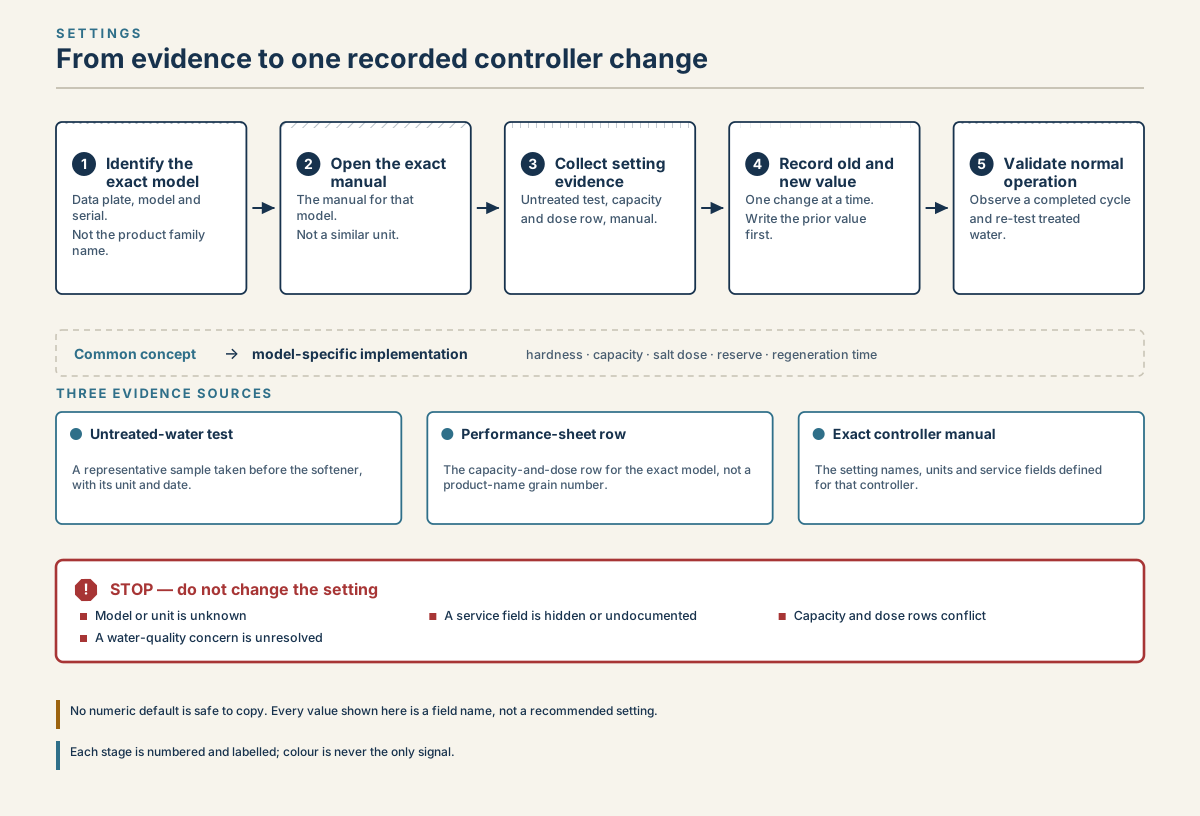
Five-step water softener settings workflow from model identification and manual lookup through evidence, one recorded change, and validation, with a stop branch for missing or conflicting information.
Read diagram in text
- SETTINGS
- From evidence to one recorded controller change
- 1
- Identify the
- exact model
- Data plate, model and
- serial.
- Not the product family
- name.
- 2
- Open the exact
- manual
- The manual for that
- model.
- Not a similar unit.
- 3
- Collect setting
- evidence
- Untreated test, capacity
- and dose row, manual.
- 4
- Record old and
- new value
- One change at a time.
- Write the prior value
- first.
- 5
- Validate normal
- operation
- Observe a completed cycle
- and re-test treated
- water.
- Common concept
- →
- model-specific implementation
- hardness · capacity · salt dose · reserve · regeneration time
- THREE EVIDENCE SOURCES
- Untreated-water test
- A representative sample taken before the softener,
- with its unit and date.
- Performance-sheet row
- The capacity-and-dose row for the exact model, not a
- product-name grain number.
- Exact controller manual
- The setting names, units and service fields defined
- for that controller.
- !
- STOP — do not change the setting
- Model or unit is unknown
- A service field is hidden or undocumented
- Capacity and dose rows conflict
- A water-quality concern is unresolved
- No numeric default is safe to copy. Every value shown here is a field name, not a recommended setting.
- Each stage is numbered and labelled; colour is never the only signal.
Frequently asked questions
What should my water softener be set at?
Set the hardness to your untreated water's hardness in grains per gallon, plus any iron or potassium adjustment your manual lists. Set the time of day correctly and the regeneration time for when no one uses water, such as the 2:00 a.m. default on Whirlpool units. Leave capacity, reserve and cycle times at the installer's values.
What time should a water softener regenerate?
Choose a window that fits your household and the exact manual's cycle duration and water-use guidance. The cited Whirlpool controls use 2:00 a.m. as a default; that is not a required schedule for every home. Check the clock after a power interruption.
Should salt efficiency mode be on or off?
On Whirlpool models that have it, efficiency mode uses less salt per grain of hardness removed, at the cost of more frequent regenerations. It ships off, but Whirlpool says it must be on in California. If salt use or wastewater matters to you, turning it on is reasonable; expect the softener to regenerate more often.
Can I change my water softener settings myself?
Use only the fields your exact manual identifies as owner-accessible. Some models restrict even hardness changes to professional advice. Record values first; capacity, reserve, regeneration type and cycle times depend on the hardware and may belong to the dealer. The Fleck 5600SXT manual advises contacting the dealer before its master menu.
Sources
Sources were consulted on the dates shown. Menu names and ranges differ by model, so confirm them in your current manual.
- U.S. Environmental Protection Agency WaterSense, Guide to Selecting and Maintaining a Water-Efficient Water Softener, May 2026; consulted September 24, 2026.
- U.S. Environmental Protection Agency WaterSense, Home Maintenance — Water Softeners, updated June 16, 2026; consulted September 24, 2026.
- Pentair, IntelliWater Connected Water Softener Service Manual, Installation and Operation Guide; consulted September 24, 2026.
- Whirlpool Water Solutions, WHESFC Water Conditioner Installation and Operation Manual; consulted September 24, 2026.
- Whirlpool Water Solutions, Whirlpool WHES48 manual; consulted September 24, 2026.
- Whirlpool Water Solutions, Whirlpool WHES18 manual; consulted September 24, 2026.
- Pentair, Pentair 5600SXT manual; consulted September 24, 2026.
- Pentair, Whole House Water Softening System Installation and Operation Manual; consulted September 24, 2026.