
How to Set Water Softener Hardness
Content updated
Sources last checked
Set the hardness to the hardness of the water coming into the softener, in the unit the controller expects, which is usually grains per gallon (gpg). If your test or utility report is in mg/L or ppm, divide by 17.12. Then add any adjustment your manual calls for: the cited Whirlpool WHESFC and Pentair Whole House manuals add 5 grains for every 1 ppm of clear-water iron, and Whirlpool's WHES18 manual adds 25% if you use potassium chloride instead of sodium chloride salt.
Enter the number through the controller's setup or program menu (the steps for common models are below), write down the old value first, and test your softened water a few days later.
Hardness rule: Enter the untreated-water hardness in the controller's unit, plus only the adjustments your manual lists. Changing the number to fix a different problem, such as frequent regeneration, just moves the problem.
Get the right hardness number
The controller needs the hardness of the water before it is softened. Pentair's IntelliWater manual says the value should match the hardness of the incoming untreated water supply, and that changing it recalculates the treatment volume and the interval between regenerations. Pentair's Whole House manual likewise asks for the hardness of the incoming water in grains per gallon.
Where to get it:
- City water: check your utility's water quality report or ask it for a current hardness result; the Consumer Confidence Report may omit hardness because it focuses on regulated contaminants. Confirm that the value represents your supply and reporting unit. If only a range is available, ask how it varies before selecting a controller setting. The city water guide explains this route.
- Well water or no report: test a tap that is not softened: an outdoor faucet if it bypasses the softener, or any tap with the softener in bypass. Test strips or a drop-count titration kit work; the hardness testing guide compares them.
- Not from a softened tap. A reading from a kitchen tap after the softener measures how well it is working, not what to enter.
Check the label on the result:
| Result or label | Meaning in this workflow | Action |
|---|---|---|
| gpg | Grains per U.S. gallon as calcium carbonate | Use directly only if the controller expects gpg |
| mg/L as CaCO3 | Milligrams per liter on a calcium-carbonate basis | Convert if the controller expects gpg |
| ppm as CaCO3 | Parts per million on the same reported hardness basis | For ordinary water reporting, follow the source/manual treatment of ppm and mg/L; preserve the original label |
| calcium or magnesium alone | Concentration of one constituent, not necessarily total hardness as CaCO3 | Do not enter as total hardness without a valid laboratory calculation |
| TDS or conductivity | Different water-quality measures | Do not substitute for hardness |
| treated-water hardness | Output measurement after the softener | Use for validation, not as the incoming hardness input |
| unlabeled number | Unknown | Stop and identify the unit |
EPA's water softener guide also recommends working with the manufacturer or a professional to program regeneration from the incoming hardness and water use, which is exactly what this setting feeds.
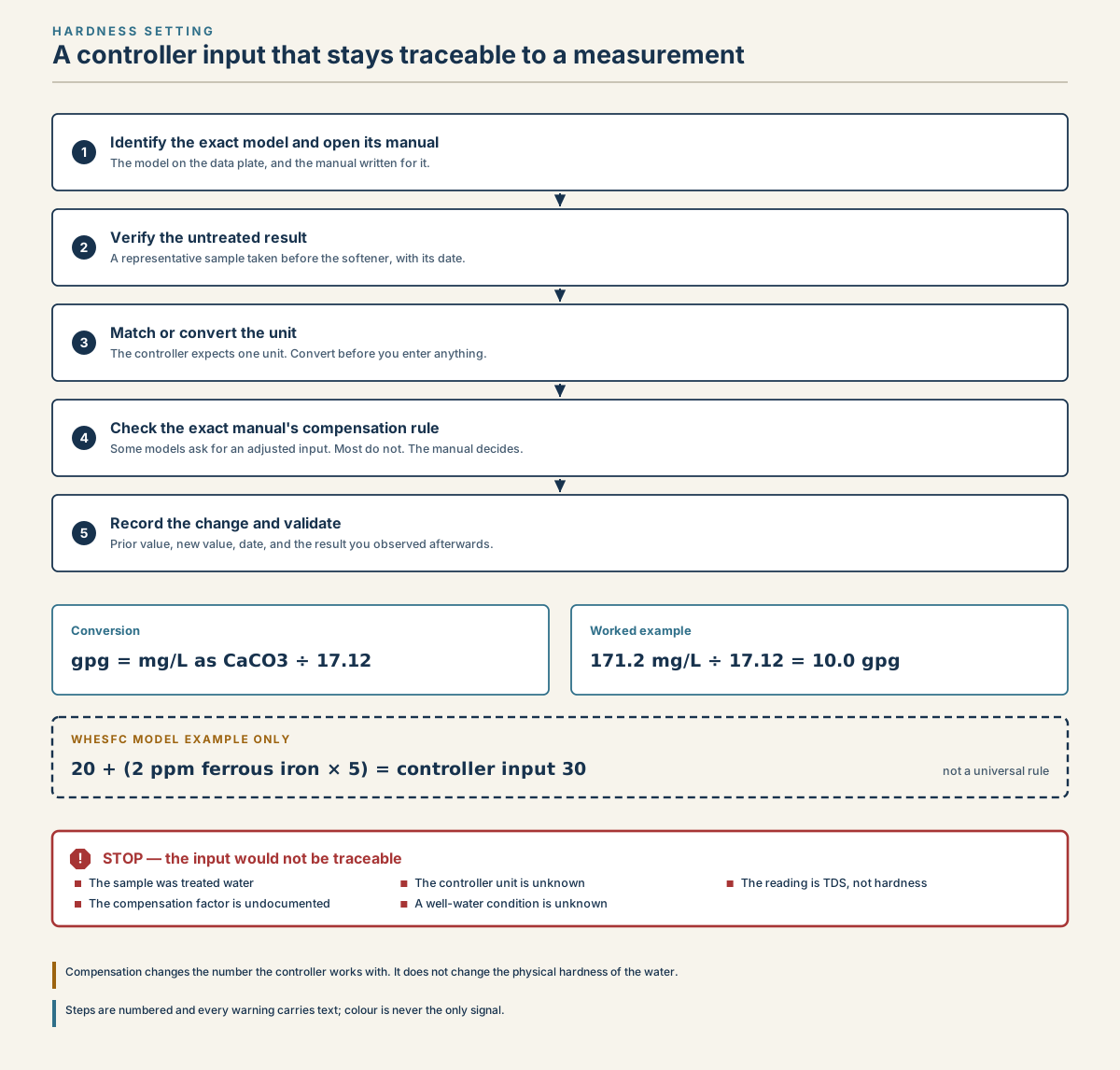
Five-step water softener hardness workflow showing model identification, untreated-water testing, unit conversion, model-specific compensation, and validation, with stop warnings for invalid inputs.
Read diagram in text
- HARDNESS SETTING
- A controller input that stays traceable to a measurement
- 1
- Identify the exact model and open its manual
- The model on the data plate, and the manual written for it.
- 2
- Verify the untreated result
- A representative sample taken before the softener, with its date.
- 3
- Match or convert the unit
- The controller expects one unit. Convert before you enter anything.
- 4
- Check the exact manual's compensation rule
- Some models ask for an adjusted input. Most do not. The manual decides.
- 5
- Record the change and validate
- Prior value, new value, date, and the result you observed afterwards.
- Conversion
- gpg = mg/L as CaCO3 ÷ 17.12
- Worked example
- 171.2 mg/L ÷ 17.12 = 10.0 gpg
- WHESFC MODEL EXAMPLE ONLY
- 20 + (2 ppm ferrous iron × 5) = controller input 30
- not a universal rule
- !
- STOP — the input would not be traceable
- The sample was treated water
- The controller unit is unknown
- The reading is TDS, not hardness
- The compensation factor is undocumented
- A well-water condition is unknown
- Compensation changes the number the controller works with. It does not change the physical hardness of the water.
- Steps are numbered and every warning carries text; colour is never the only signal.
Convert mg/L or ppm to gpg
USGS reports hardness as calcium carbonate, and its conversion tables support the factor used here (USGS hardness overview; USGS conversion report):
gpg = mg/L ÷ 17.12, and for ordinary hardness reports ppm is the same as mg/L.
| Your result | Calculation | gpg |
|---|---|---|
| 120 mg/L | 120 ÷ 17.12 | 7.01 |
| 171.2 mg/L | 171.2 ÷ 17.12 | 10.00 |
| 240 ppm | 240 ÷ 17.12 | 14.02 |
| 342 mg/L | 342 ÷ 17.12 | 19.98 |
Keep the unrounded conversion in your test record. For a controller that accepts only whole numbers, use its documented rounding or programming rule; if no rule is given, ask the manufacturer or installer how to handle the fraction. The water hardness calculator converts units but does not choose the controller setting.
Add for iron or potassium salt
Two manual-specified adjustments raise the number you enter:
Clear-water (ferrous) iron. The Whirlpool WHESFC manual says to add 5 grains to the hardness setting for every 1 ppm of ferrous iron. Its example: 20 gpg hardness with 2 ppm iron gives 20 + (2 × 5) = 30. Pentair's Whole House manual gives the same rule (+5 for every 1 ppm of iron).
- This applies only to clear-water iron, which the softener can reduce in moderate amounts. The WHESFC manual says ferric (red-water) and bacterial iron are not removed by the softener, and that iron type should be found by chemical analysis.
- Some controllers have a separate iron setting instead. The Whirlpool WHES48 manual says not to raise the hardness for iron; enter the iron level in its own menu and the control compensates.
Potassium chloride salt. The Whirlpool WHES18 manual says to raise the hardness setting by 25% when using potassium chloride (KCl) instead of sodium chloride. Example: 20 gpg water becomes a setting of 25.
If your manual lists neither adjustment, enter the plain hardness.
Enter it on your controller
Write down or photograph the current setting before changing it. Then use the steps for your model:
| Controller | How to reach the hardness setting |
|---|---|
| Whirlpool WHESFC and WHES18 (button display) | Press Program repeatedly until "HARDNESS" and a flashing number (25 by default) appear; set it with the up and down buttons, then press Program again |
| Whirlpool WHES48 (touch screen) | Setup, then Set Hardness; adjust with the up and down buttons and press Return |
| Pentair Fleck 5600SXT | Hold Up and Down together for 5 seconds while in service; press Extra Cycle to move past DO and RT to H (feed water hardness); set the value; press Extra Cycle to continue and exit |
| Pentair Whole House (1.0, 1.5, 2.0) | Hold Down 5 seconds, enter Down, Down, Scroll, Down within 10 seconds, press Scroll past unit size to "WATER HARD" (20 by default) |
| Pentair IntelliWater | From the Home screen, press Settings, then hardness |
Sources: Whirlpool WHESFC, Whirlpool WHES18, Whirlpool WHES48, Pentair 5600SXT, Pentair Whole House, Pentair IntelliWater.
A few notes from those manuals:
- On the 5600SXT, the user menu opens only when the clock is not set to 12:01 PM (that time opens the installer menu instead), and changes are discarded if no button is pressed for 60 seconds.
- On the IntelliWater, Pentair says to change the hardness setting only on a professional's advice. The hardness units can be changed only when metric units are selected.
- If your model is not listed, look for Program, Setup or Settings in the manual's index. If hardness sits inside an installer or master menu, that is a sign the manufacturer expects a dealer to set it.
Check the result
- Note the change in your maintenance log: date, old value, new value, and where the hardness number came from.
- Record a completed regeneration under the new setting when the manual requires it for validation. A few calendar days do not prove that a metered cycle occurred.
- Test a verified treated cold tap with the same method and unit used for the untreated sample. Compare with the manual's expected result. Similar readings warrant rechecking sample location, bypass, method and cycle state before diagnosing a fault.
- Watch the regeneration interval. Raising the hardness makes cycles more frequent, lowering it less frequent. The interval should now be close to capacity ÷ hardness ÷ daily use; see how often a softener should regenerate.
When the setting is not the problem
If the hardness setting matches your tested water and the softened water is still hard, raising the number further only wastes salt. Look at the rest of the system instead:
- salt level, a salt bridge, or salt not being used: see softener not using salt;
- the softener not regenerating: see softener not regenerating;
- a bypass valve left partly open, or high iron fouling the resin.
The water softener settings guide covers the other fields, such as capacity, salt dose and reserve, that work alongside hardness.
Frequently asked questions
What hardness number should I enter in my water softener?
Enter the hardness of your untreated incoming water, usually in grains per gallon. Get it from a test of unsoftened water or your utility's water quality report, divide mg/L or ppm by 17.12, then add only what your manual lists, such as 5 grains per ppm of clear-water iron or 25% for potassium chloride salt.
How do I convert ppm or mg/L to a gpg setting?
Divide by 17.12: 120 ppm is about 7.01 gpg and 240 mg/L is about 14.02 gpg for ordinary hardness reporting. Preserve the original and unrounded values. If the control accepts only whole numbers, follow its programming rule or ask the manufacturer; display rounding does not decide that setting.
Should I add extra hardness for iron?
Only if your manual says so. Whirlpool's WHESFC and Pentair's Whole House manuals add 5 grains per 1 ppm of clear-water iron. Some controllers, such as the Whirlpool WHES48, have a separate iron setting instead and say not to raise hardness. Red-water or bacterial iron needs other treatment, not a higher number.
Why is my water still hard after setting the hardness?
The setting controls when the softener regenerates; it cannot make up for a fault. If the number matches your tested water, check for low salt or a salt bridge, a bypass valve left open, a softener that is not regenerating, or iron fouling. Raising the hardness further will mostly increase salt use.
Sources
Sources were consulted on the dates shown. Menus differ by model and firmware, so confirm the steps in your current manual.
- U.S. Environmental Protection Agency WaterSense, Guide to Selecting and Maintaining a Water-Efficient Water Softener, May 2026; consulted August 27, 2026.
- U.S. Environmental Protection Agency WaterSense, Home Maintenance — Water Softeners, updated June 16, 2026; consulted August 27, 2026.
- U.S. Geological Survey, Hardness of Water; consulted August 27, 2026.
- U.S. Geological Survey, Conversion Factors and Miscellaneous Tables, Open-File Report 65-82, 1964; consulted August 27, 2026.
- Pentair, IntelliWater Connected Water Softener Service Manual, Installation and Operation Guide; consulted September 24, 2026.
- Pentair, Whole House Water Softening System Installation and Operation Manual; consulted September 24, 2026.
- Whirlpool Water Solutions, WHESFC Water Conditioner Installation and Operation Manual; consulted September 24, 2026.
- Pentair, Pentair 5600SXT manual; consulted September 24, 2026.
- Whirlpool Water Solutions, Whirlpool WHES18 manual; consulted September 24, 2026.
- Whirlpool Water Solutions, Whirlpool WHES48 manual; consulted September 24, 2026.
Before you continue
Every instruction here refers to the exact model on your unit's data plate. There is no universal button sequence: check the manual for your model before acting.