
Printable Water Softener Maintenance Log
Sources last checked
Use this maintenance log to preserve comparable evidence—not just a list of completed chores. Start with the exact model/manual baseline, then create one event row for every inspection, hardness test, salt addition, completed regeneration, cleaning, setting change, fault or professional service visit.
Printable worksheet
Printable Water Softener Maintenance Log
Download a printable water softener maintenance log to track model details, hardness tests, salt, regenerations, inspections, service and next due dates.
Open the printable water softener maintenance log (print sheet, US Letter)Print at 100% scale. Fits US Letter without cropping.
Two versions are available:
- the printable maintenance log, with baseline, event and service-handoff pages; and
- the list of log fields, to copy into a spreadsheet.
A date on the calendar never authorizes a chemical, internal repair, forced cycle or setting change. The exact manufacturer manual, observed condition and qualified reviewer control the task. If there is an active leak, overflow, water near electricity, damaged pressure connection, continuous unexplained drain or suspected freeze damage, use the appropriate stop/service process rather than filling out the log first.
Logging rule: Preserve the original observation and add corrections as new records. Use a local equipment ID, consistent units and defined sample points. Keep addresses, utility accounts and personal contact details out of the downloadable log.
Download and set up the log
Keep a clean master copy and print additional event pages. Use a stable equipment ID such as WS-01; do not enter a street address, utility account, email or personal phone number. Store a private service contact separately if needed.
For a digital copy, do not overwrite prior rows. Add corrections as a new record with a reference to the original event. Keep photographs, test-strip images, receipts, manuals and service reports in a controlled folder and enter only their filename/reference in the log.
Choose one person to maintain the record and another to review technical changes where possible. The owner can record observations without claiming to have performed professional service.
The log uses four evidence states:
observed: directly seen or measured;documented: supported by an exact manual, receipt or service report;not observed: the field could not be checked;not applicable: the field does not apply, with a reason.
Do not turn an empty field into “normal.” Unknown stays unknown.
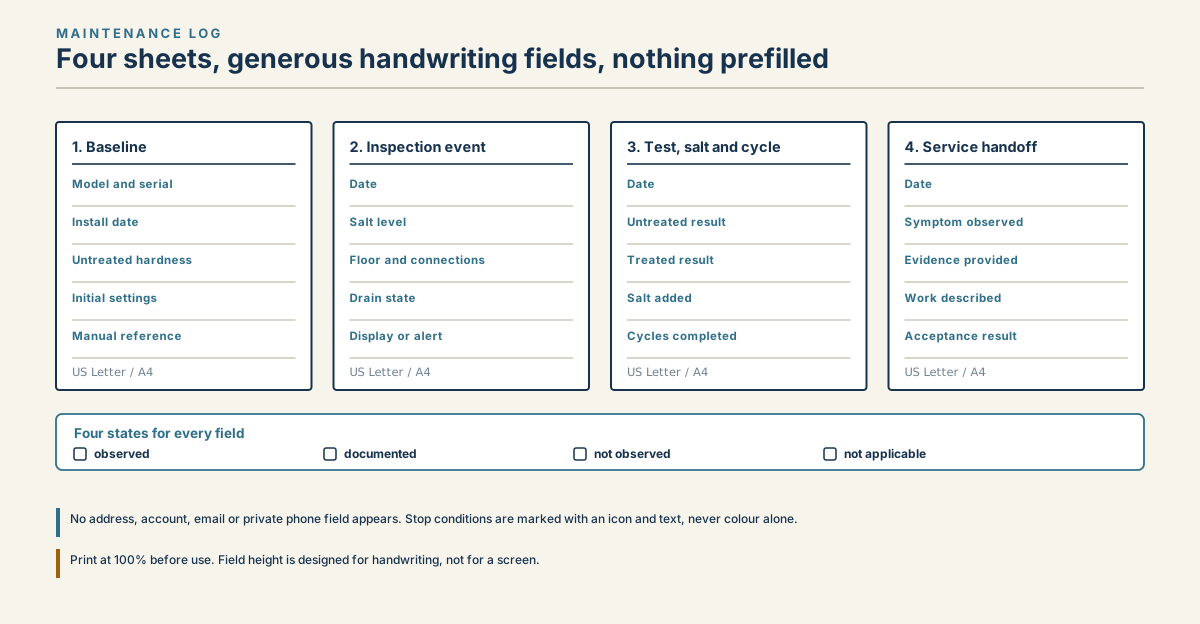
Four-page printable water softener maintenance log for baseline, inspections, tests, salt, cycles and service.
Read diagram in text
- MAINTENANCE LOG
- Four sheets, generous handwriting fields, nothing prefilled
- 1. Baseline
- Model and serial
- Install date
- Untreated hardness
- Initial settings
- Manual reference
- US Letter / A4
- 2. Inspection event
- Date
- Salt level
- Floor and connections
- Drain state
- Display or alert
- US Letter / A4
- 3. Test, salt and cycle
- Date
- Untreated result
- Treated result
- Salt added
- Cycles completed
- US Letter / A4
- 4. Service handoff
- Date
- Symptom observed
- Evidence provided
- Work described
- Acceptance result
- US Letter / A4
- Four states for every field
- observed
- documented
- not observed
- not applicable
- No address, account, email or private phone field appears. Stop conditions are marked with an icon and text, never colour alone.
- Print at 100% before use. Field height is designed for handwriting, not for a screen.
Record the equipment baseline
Complete the baseline once and create a dated revision whenever the equipment, plumbing or programming changes.
Record:
- equipment ID, manufacturer, full model and serial;
- controller/valve model and software version if visible;
- installation and service dates;
- official manual title, document/revision, URL and access date;
- water source and untreated sample point;
- representative incoming hardness with unit, method and date;
- treated sample point and acceptance criterion;
- capacity-and-salt-dose pair from exact documentation;
- hardness, reserve, day override and regeneration mode as programmed;
- approved salt chemistry/form actually used;
- bypass type and intended service position;
- drain and overflow termination references;
- upstream/downstream treatment equipment; and
- responsible reviewer and next baseline review date.
Attach a normal-state photo of the dry floor, connections, display and brine-tank level without exposing addresses or account numbers. That baseline makes later moisture, movement and display changes easier to identify.
If the exact model/manual cannot be matched, mark the baseline incomplete. Continue only with non-invasive observations and identification. Do not import settings, cleaning instructions or service steps from a similar control.
Complete a routine inspection row
Use one row per visit. Record the date/time and the trigger: routine interval, alert, salt refill, hardness complaint, power outage, post-vacation return, completed regeneration, repair follow-up or another documented event.
From a safe accessible position, record:
- floor and exterior connections dry/wet/not observed;
- overflow area and drain status;
- current display, clock, alert or error code;
- service/bypass state;
- current salt level using the same reference method;
- hardening, suspected void/bridge, residue or unusual water evidence;
- unexpected noise, odor, heat or vibration;
- last completed regeneration/counter if exposed; and
- any household demand, plumbing or source-water change.
Photograph from the same angle when useful. Do not open the valve, disturb pressure connections, reach into the brine system or reset diagnostic totals merely to complete a field.
EPA's home maintenance guidance recommends periodic salt checks, attention to salt bridges, annual brine-tank cleaning and annual professional service as general practices. Those are planning inputs, not permission to perform a model-specific task. Reconcile every cadence with the exact manual and actual use.
Track hardness, salt and regeneration
Hardness tests
Every result requires value, unit, method/kit, sample point, date/time and cycle/bypass context. Keep untreated and treated results in separate fields. If the method reports a range or detection threshold, record it exactly rather than selecting a midpoint.
Use the hardness testing guide for sample discipline. Hardness does not determine potability or an unrelated contaminant claim.
Salt additions
Record chemistry, form, product/lot where available, pounds added, price/receipt reference, before/after level and any controller salt-monitor action required by the exact manual. Bag weight is not the salt dose per regeneration.
Do not calculate salt consumption from a level glance. Use a defined observation window, completed cycles and a documented dose or an inventory balance through the salt usage calculator.
Regeneration events
Separate queued, started and completed. Record command/source (automatic, documented manual request or service), start/end timestamps, stages shown, drain observation, final service state and error. Do not count a queued or interrupted event as completed.
The regeneration guide explains cycle context, while the manual regeneration guide controls evidence for a one-time request. Neither creates a universal button sequence.
Record cleaning, changes and service
Cleaning and programming changes need more detail than “done.” Record:
- reason/condition;
- exact manual page or service procedure;
- product name, chemistry, lot and label reference when used;
- precondition and postcondition;
- settings before and after;
- person/role performing the work;
- hardness or cycle acceptance result;
- unresolved items; and
- next due/trigger.
Never backdate a record or label an owner observation as professional service. When a technician performs work, attach the service report and identify parts/procedures from that document without inventing a diagnosis.
The maintenance guide provides a model-first cadence framework. The log is its evidence layer: it should show what actually happened and why the next date exists.
Use trigger-based tasks and stop rules
Many useful maintenance events are triggered by change rather than time:
- source-water or incoming-hardness change;
- power outage or clock reset;
- setting, bypass or plumbing change;
- unexpected regeneration frequency;
- salt level not declining across completed cycles;
- treated hardness outside the written criterion;
- alert/error or inability to return to service;
- leak, overflow or unexpected drain flow; and
- return from vacation, bypass, service or freeze-risk condition.
Create the event immediately and set a disposition: pass, monitor, corrected, service required or stop/unsafe. “Monitor” must include what will be observed, who owns it and when/what triggers escalation.
Stop conditions override routine work. Do not complete a planned salt refill or cleaner treatment while water is uncontrolled, electricity is wet, a tank/connection is damaged, an unknown chemical is present or the system is behaving outside the manual.
Review the log quarterly or before service
The review interval is administrative, not a universal equipment-service cadence. Summarize comparable periods:
- untreated/treated hardness trend;
- completed cycles and days between them;
- pounds and delivered cost of salt added;
- service/bypass/vacation periods;
- errors, leaks and drain observations;
- cleaning/service events;
- setting/manual revisions; and
- open actions and overdue reviews.
Do not average incompatible units, methods, sample points or periods that span a setting change. Preserve raw rows and explain exclusions.
Before a service appointment, print the baseline, relevant events and a one-page handoff with the symptom, exact model/manual, first/last occurrence, errors, hardness, cycles, salt/inventory, settings changes and stop conditions. The troubleshooting checklist helps separate symptoms from causes.
Frequently asked questions
How often should I update the log?
At every inspection, test, salt addition, completed cycle of interest, change, alert, fault or service event. Use the exact manual and observed use to set task cadence: the log records what happened, it does not dictate the work or replace the current manufacturer manual.
Should I record every regeneration?
Record enough completed events or counter readings to answer the ownership question, and during diagnosis capture each relevant queued, started and completed state separately. Do not fabricate events when the controller does not expose history; mark the field "not observed" instead.
What if I made a recording mistake?
Add a correction row that references the original record. Do not delete the original or silently change a measurement, and never backdate an entry or label an owner observation as professional service. Preserving the first observation is what keeps the trend interpretable later.
Should the log contain my address or account number?
No. A local equipment ID such as WS-01 is sufficient. Keep contact, address and utility-account information in a separate protected system when operationally necessary, and store photographs, receipts and service reports by filename reference only. The log is meant to be shareable with a technician.
Sources
Sources were consulted on August 27, 2026. Maintenance intervals come from the manual for each model, so copy yours into the log.
- U.S. Environmental Protection Agency WaterSense, Home Maintenance — Water Softeners, updated June 16, 2026; consulted August 27, 2026.
- U.S. Environmental Protection Agency WaterSense, Guide to Selecting and Maintaining a Water-Efficient Water Softener, May 2026; consulted August 27, 2026.
- NSF, NSF/ANSI 44 Technical Requirements, March 8, 2025; consulted August 27, 2026.
- Pentair, Pentair 5600SXT manual; consulted August 27, 2026.
- Whirlpool Water Solutions, Whirlpool WHES48 manual; consulted August 27, 2026.
- Whirlpool Water Solutions, Whirlpool Water Softener & Filtration System Manuals; consulted August 27, 2026.